

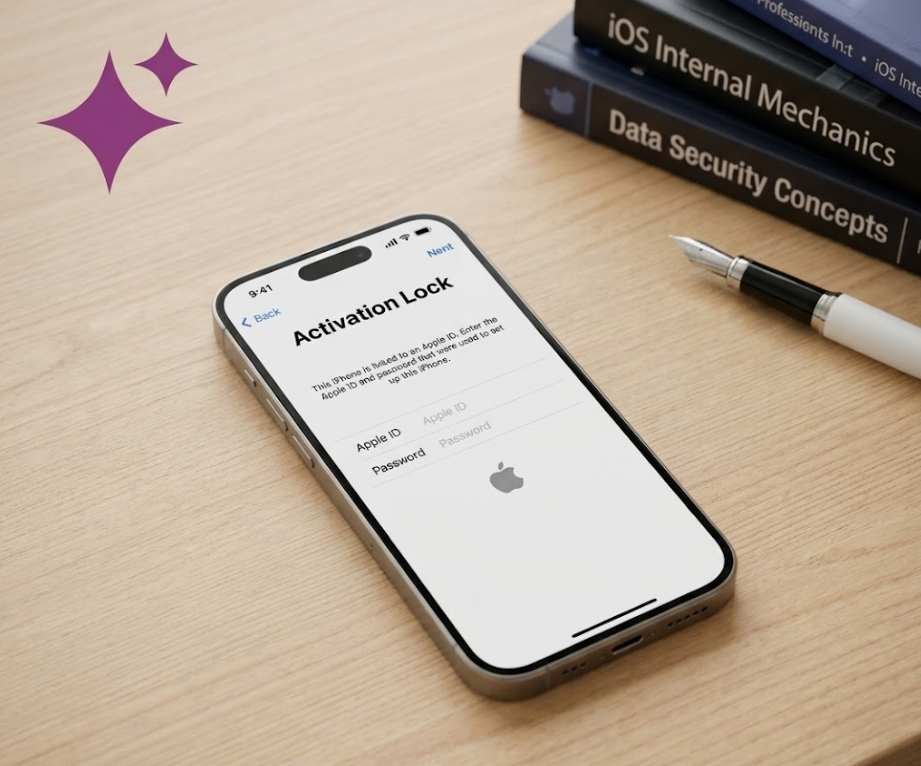
Bought a second-hand iPhone only to be greeted by an Activation Lock screen? You are not alone. Millions of people every year encounter the iCloud locked iPhone problem — and most of them have no idea what to do next. Here is the definitive guide.
1. What Is an iCloud Locked iPhone?
An iCloud locked iPhone — technically called an Activation Lock device — is an iPhone (or iPad, or iPod touch) that has been bound to a specific Apple ID and cannot be activated, set up, or used without the original owner’s Apple ID credentials. The moment you power on the device or try to restore it through iTunes or Finder, you are stopped cold by a grey screen asking for an email address and password you simply do not have.
This protection is not a bug or a glitch. It is an intentional, deeply embedded feature introduced by Apple in iOS 7 back in 2013 as part of the Find My iPhone initiative. The goal was simple yet transformative: make stolen iPhones worthless on the resale market. Before Activation Lock existed, iPhone theft in major US cities was at crisis levels. Within a year of the feature’s rollout, iPhone thefts dropped dramatically in cities like San Francisco and New York.
“Activation Lock is perhaps the single most effective anti-theft measure ever deployed in consumer electronics. It turned the world’s most stolen device into a very expensive paperweight for criminals.”
Today, every iPhone running iOS 7 or later automatically enables Activation Lock the moment the user signs in with an Apple ID and turns on Find My iPhone in Settings — which iOS now enables by default during the initial device setup. So virtually every modern iPhone in circulation is either legitimately owned or potentially locked.
2. How Apple Activation Lock Works
Understanding the mechanism behind Activation Lock helps you understand why it is so hard to bypass — and why most “unlock” services online are either scams, limited solutions, or carry serious risks.
When Find My is enabled on an iPhone, Apple’s servers register the device’s unique hardware identifiers — including the IMEI number and the device serial number — against the owner’s Apple ID. This registration happens in Apple’s iCloud infrastructure, not on the device itself. That is the crucial detail most people miss.
Even if you perform a factory reset, update the firmware, swap the SIM card, or use third-party software to wipe the device, the Activation Lock persists because it lives on Apple’s servers. The device will always “phone home” to Apple’s activation servers during setup, and until the original Apple ID is cleared from the record, it will remain locked.
What triggers Activation Lock on your device?
- Signing into iCloud with an Apple ID on any iPhone
- Enabling Find My iPhone in Settings → [Your Name] → Find My
- Setting up a new iPhone (iOS 12 and later enables Find My by default)
- Remotely wiping a device via iCloud.com (the lock remains even after remote erase)
Quick Technical Note
Activation Lock is tied to both your Apple ID and your device’s hardware identifiers in Apple’s servers. No amount of local software manipulation can remove it — only Apple’s activation servers can grant clearance, which they only do when the correct Apple ID credentials are provided or Apple Support manually removes the lock.
3. Why iCloud Lock Matters — The Real Numbers
24%
of used iPhones listed online may have Activation Lock enabled
iOS 7
First iOS version to introduce Activation Lock (2013)
~50%
Drop in iPhone theft reported in NYC within a year of launch
$0
Resale value of an iCloud locked iPhone to most buyers
These numbers tell a compelling story. iCloud locked iPhones are a massive problem in the second-hand smartphone market. Consumer advocacy groups and phone resale platforms consistently report that a significant minority of used iPhones change hands in a locked state — often because sellers forget to sign out of iCloud before selling, or in some cases because the device is reported lost or stolen.
For buyers, the financial sting can be severe. A locked iPhone 15 Pro Max purchased from an online marketplace for $800 is effectively a paperweight. For sellers, failing to remove Activation Lock can destroy buyer trust and trigger refund disputes. And for those who simply forgot their own Apple ID password, the experience can be genuinely frustrating and costly.
4. Common Scenarios: Who Gets Stuck With an iCloud Locked iPhone?
Not everyone dealing with an iCloud locked device is in the same situation. The correct solution depends heavily on how you ended up with the locked phone in the first place.
Scenario A — The Second-Hand Buyer
You bought an iPhone from an online marketplace, a local seller, or even a physical phone shop, and when you power it on, you are met with the Activation Lock screen. The seller may be unresponsive, overseas, or genuinely unaware of the issue. This is the most common scenario and the most complicated to resolve.
Scenario B — The Forgetful Original Owner
You owned the device, performed a factory reset, then discovered you cannot get past the activation screen because you no longer remember your Apple ID password or the email address associated with it. This is more solvable than Scenario A because you have a legitimate claim to the device.
Scenario C — The Estate or Gift Situation
A family member passed away and left behind an iPhone. Or someone gifted you an old device without properly signing out first. Apple has a specific process for this — the Apple Legacy Contact feature and a manual Apple Support review process — but it requires documentation.
Scenario D — Remote Wipe Aftermath
The original owner remotely erased the device via iCloud.com after losing it or suspecting theft. Even after the wipe, Activation Lock remains active. The owner may have since recovered the device but forgotten to remove it from their iCloud.
Important
Your scenario determines which solution applies to you. Skipping straight to third-party tools without first exhausting official methods is a common — and often costly — mistake.
5. Official Methods to Unlock an iCloud Locked iPhone
Apple provides several legitimate pathways to remove Activation Lock. These are always the first options you should pursue — they are free, reliable, and carry no risk of voiding your warranty or compromising the device.
Method 1: Ask the Previous Owner to Remove the Device Remotely
This is the simplest and most reliable solution when buying second-hand. The original owner can remove the device from their Apple ID without even having the phone in hand. Here is how:
- Go to iCloud.com/find — The original owner visits this URL on any browser and signs in with their Apple ID.
- Select the device — They click on the locked iPhone in the device list.
- Click “Remove from Account” — This removes the device from their Apple ID and clears Activation Lock on Apple’s servers.
- Restart and set up — You can now restart the iPhone and set it up with your own Apple ID.
Alternatively, the previous owner can go to Settings → [Their Name] → scroll to the device → Tap the device → Remove from Account directly from their own current iPhone or iPad.
Method 2: Use the Device Passcode (iOS 15.2 and Later)
Apple introduced a significant quality-of-life change with iOS 15.2. If the iPhone has a device passcode set and you know it, you can now bypass the Apple ID requirement during Activation Lock setup in certain conditions. Specifically, after a factory reset on a device running iOS 15.2 or later, iOS will offer the option to unlock Activation Lock using the device passcode rather than the full Apple ID and password. This is particularly useful for people who forgot their Apple ID password but still know their screen lock passcode.
Method 3: Apple Support Removal with Proof of Purchase
If you cannot contact the previous owner and you have legitimate proof of purchase, Apple Support may manually remove the Activation Lock. This process is not guaranteed — Apple evaluates each case individually — but it is the most reliable official path when the previous owner is unavailable.
To make this request:
- Contact Apple Support via apple.com/support
- Provide the device serial number (found on the box or visible on the Activation Lock screen)
- Submit proof of purchase: original receipt, bank transaction record, or purchase invoice
- Be prepared for a waiting period while Apple verifies your claim
Pro Tip
When buying a used iPhone, always ask the seller to remove it from their iCloud account in your presence before money changes hands. If they refuse or say they will “do it later,” walk away. This single precaution eliminates the entire problem.
6. Third-Party Unlock Tools: Do They Actually Work?
A search for “iCloud activation lock removal” returns hundreds of third-party software products and online services. The most commonly mentioned include PassFab iPhone Unlock, iMobie AnyUnlock, MagFone Activation Unlocker, and dozens of similar utilities. The question on everyone’s mind: do any of these actually work?
The honest answer is: sometimes, partially, and always with caveats. Here is a breakdown of what these tools can and cannot realistically do.
What Third-Party Tools Can Potentially Do
- Bypass the activation screen — Some tools, particularly those that require putting the device into DFU (Device Firmware Update) mode, can exploit certain iOS vulnerabilities to get past the Activation Lock screen and make the device partially functional. Critically, “bypass” does not mean “remove” — the lock may still be technically active on Apple’s servers.
- Remove Apple ID on jailbroken devices — On older, jailbroken iPhones, some tools have historically been able to manipulate the device-side components of the authentication chain. This is rare, increasingly difficult as iOS matures, and voids any warranty.
- Assist with Apple ID password recovery — Some tools help you recover your own forgotten Apple ID credentials through legitimate means such as recovery keys or trusted devices.
Critical Limitations and Risks
- Varying success rates — Effectiveness is highly dependent on the iOS version, device model, and whether Apple has patched the specific vulnerability the tool exploits. A tool that worked on iOS 16 may be completely ineffective on iOS 17 or 18.
- Data loss is almost certain — Any process that bypasses or removes Activation Lock at the device level involves a complete factory reset. All photos, messages, apps, and personal data are wiped permanently.
- Licensing and scam risk — The third-party unlock space is rife with scams. Many services charge upfront fees and deliver nothing. Always research tools thoroughly before paying anything.
- Legal gray area — Using bypass tools on a device you do not legitimately own may violate computer misuse laws in your jurisdiction. Always ensure you have a rightful claim to the device.
Warning
If a website or service promises to “remove iCloud lock online in 5 minutes” for a fee, treat it with extreme skepticism. The vast majority of such services are scams. Apple’s activation servers cannot be manipulated by third-party websites — any claim to the contrary is almost certainly fraudulent.
7. IMEI Blacklist Check — The Step Most People Skip
Before investing any time or money into unlocking an iCloud locked iPhone, there is one critically important step that far too many people overlook: checking whether the device’s IMEI number is blacklisted.
A blacklisted iPhone is a device that has been reported as lost or stolen to a carrier or law enforcement. Activation Lock and blacklisting are two separate but related issues. A phone can be blacklisted even if it no longer has an iCloud lock, and a locked phone can sometimes be removed from a blacklist by the original owner.
Why does this matter? Because even if you successfully remove the Activation Lock using official or third-party methods, a blacklisted iPhone will still be blocked from connecting to most mobile networks. The device becomes Wi-Fi only — and you may have unknowingly purchased stolen property, which carries its own legal implications.
How to Check the IMEI Status
The IMEI number is typically visible on the Activation Lock screen itself — you do not need to unlock the phone to find it. You can also check the back of the device or the original box. Once you have the IMEI, services like UnlockRiver, IMEI.info, and carrier-specific IMEI check tools can tell you whether the device is clean, blacklisted, or reported stolen.
The Smart Buyer’s Rule
Never purchase a used iPhone — locked or unlocked — without running an IMEI check first. A clean IMEI report is a basic quality signal for any second-hand device transaction. Reputable resale platforms like Apple Certified Refurbished or carrier trade-in programs provide this verification automatically.
8. Method Comparison: At a Glance
| Method | Cost | Success Rate | Data Preserved? | Legal & Safe? | Best For |
|---|---|---|---|---|---|
| Previous owner removes via iCloud.com | Free | Very High | Yes | Yes | Anyone with seller contact |
| Device passcode (iOS 15.2+) | Free | Moderate | No | Yes | Original owner, forgot Apple ID |
| Apple Support with proof of purchase | Free | Moderate | No | Yes | Legitimate owners, no seller contact |
| Apple ID account recovery | Free | High (own device) | Varies | Yes | Original owner, forgotten credentials |
| PassFab / AnyUnlock / MagFone | Paid ($30–$60) | Low–Moderate | No | Gray area | Last resort, own device only |
| Online “instant removal” services | Paid ($5–$50) | Very Low / Scam | No | Risky | Not recommended |
9. How to Avoid Buying an iCloud Locked iPhone
Prevention is worth far more than any cure when it comes to iCloud locked devices. Whether you are shopping on eBay, Facebook Marketplace, Craigslist, or a local phone store, these steps will protect you from a frustrating and potentially expensive mistake.
- Test the device before paying — Power on the device and verify it reaches the home screen or the new device setup screen (not the Activation Lock screen). If the seller insists on meeting only after you have transferred payment, be very cautious.
- Ask the seller to sign out of iCloud — Go to Settings → [Seller’s Name] → Sign Out. Watch them do it. Once they sign out, Find My is disabled and Activation Lock is cleared automatically.
- Check “About” for the Apple ID — After sign-out, go to Settings → General → About and confirm the device serial number. Check this against the box if available.
- Run an IMEI check — Dial *#06# on the device to display the IMEI, or find it in Settings → General → About. Run it through a free IMEI checker before completing the sale.
- Buy from reputable sources — Apple Certified Refurbished, major carrier trade-in programs, or verified resale platforms with buyer protection offer the best security. The slightly higher price is insurance against lock-related headaches.
10. Frequently Asked Questions
Can I use an iCloud locked iPhone at all?
Very limited use, if any. You can make emergency calls from the lock screen in some cases, but you cannot access apps, data, the internet, or set up the device. It is essentially a non-functional device for everyday use.
What happens if I restore an iCloud locked iPhone through iTunes?
The factory restore will complete, but you will still hit the Activation Lock screen afterwards. The lock is stored on Apple’s servers, not on the device hardware, so a local restore does not remove it.
Can Apple unlock an iCloud locked phone for free?
Apple Support can remove Activation Lock at no charge if you provide sufficient proof of purchase and meet their verification criteria. However, they do not unlock devices as a universal service — your case must demonstrate legitimate ownership.
Is an iCloud locked iPhone worth anything?
In most resale contexts, no — or very little. Some buyers purchase locked iPhones for parts (screens, cameras, chassis), and a small market exists for technically skilled buyers who believe they can unlock devices. The price should reflect the extreme uncertainty. Never pay anywhere near market value for a locked device.
Does replacing the motherboard remove iCloud lock?
No. Activation Lock is not stored on the motherboard or any physical hardware in the device — it resides on Apple’s activation servers tied to the Apple ID and device identifiers. Even a full motherboard replacement would not clear the server-side record.
What is DFU mode and does it help with iCloud lock?
DFU (Device Firmware Update) mode is a deep recovery state that allows iTunes or Finder to reinstall the device firmware from scratch. While some third-party tools use DFU mode as part of their bypass process, DFU mode alone does not remove Activation Lock. It can be a step in a larger bypass procedure, but it is not a standalone solution.
My family member passed away and left an iCloud locked iPhone. What do I do?
Apple has a Digital Legacy program that allows designated legacy contacts to request access to a deceased person’s Apple ID data and devices. If no legacy contact was set up, you can contact Apple Support directly with a death certificate and legal documentation proving your relationship. The process takes time but is the official and legally sound path.
Final Verdict
An iCloud locked iPhone is not the end of the road — but it does require patience, the right approach, and a realistic understanding of what is and is not possible. Here is the bottom line:
If you can contact the previous owner, that is always the fastest, cheapest, and most reliable solution. A simple two-minute process on iCloud.com is all it takes to clear Activation Lock permanently.
If you are the original owner and have simply lost your Apple ID credentials, Apple’s account recovery tools and the newer device passcode method in iOS 15.2+ give you solid official options. Take the time to go through Apple Support — it is worth it.
If you purchased a device without verifying its status, start with an IMEI blacklist check before spending any money on unlock services. If the IMEI is clean and you have proof of purchase, Apple Support is your best bet. Third-party tools are a last resort, carry real risks, and should only be used on devices you have a legitimate legal claim to.
For the future, make IMEI checks and in-person sign-out verification a non-negotiable part of any used iPhone purchase. The five minutes you spend on due diligence can save you hundreds of dollars and considerable frustration.
Apple’s Activation Lock is, at its core, a powerful and effective tool that protects honest consumers and makes life very difficult for device thieves. Understanding how it works — and how to navigate it legitimately — is simply part of being a savvy iPhone user in 2025.
Key Takeaways
Always verify iCloud sign-out before purchasing a used iPhone. Run an IMEI blacklist check on any second-hand device. Use official Apple methods first — they are free and most reliable. Third-party tools vary widely in effectiveness and carry data loss risks. An iCloud locked iPhone with a clean IMEI can potentially be unlocked through Apple Support with proof of purchase.
Disclaimer: This article is intended for informational and educational purposes only. All unlock attempts should only be performed on devices you legally own or have explicit permission to unlock. Using bypass tools on stolen or lost devices may violate laws in your jurisdiction. Always verify the legitimacy of a device before purchase. The author and publisher are not responsible for outcomes resulting from third-party tool usage.
For more tech updates Visit: Techsif